
Understanding Roles and Permissions in Tenor
Tenor offers five distinct roles to help organizations manage access and responsibilities within the platform: Admin, View-Only Admin, Instructional Designer, Team Manager, and Member (standard user). Each role comes with different levels of access to ensure both flexibility and security.
Need to update someone's role?
- Head to the Admin dashboard and click Users in the left menu.

- Search for the user, check the box next to their name, then click Change Role to see the available options.

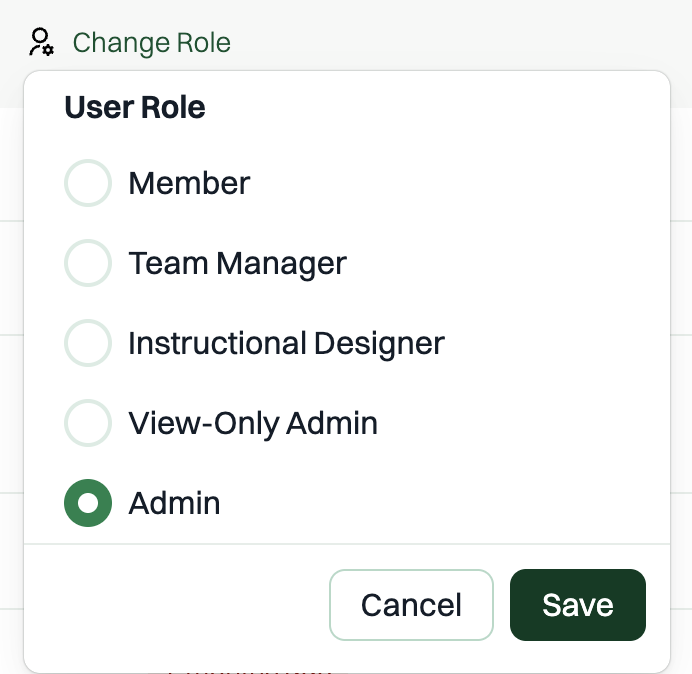
- Choose the role you want and click Save.
⚡️ You can also select multiple users at once to change their roles in bulk — they'll all be assigned the same role you choose.
Admin
Access level: Highest permissions in the platform
- Do have access to:
- Full access to all areas of the platform
- Can manage users, settings, analytics, library, integrations, and custom content
- Don’t have access to:
- Nothing is restricted. Admins can access everything in the platform.
View-Only Admin
Access level: Read-only administrative access (higher than Team Manager, lower than full Admin)
The View-Only Admin role is designed for stakeholders who need visibility into organizational activity and reporting without the ability to make changes. Users with this role keep all normal learner capabilities and additionally gain read-only access to a scoped set of Admin Dashboard areas.
- Do have access to:
- Read-only access to:
- Analytics — all sub-tabs (Overview, Roleplay, Coach)
- Users & Groups — user list, group list, group detail views, group analytics, user detail views
- Learning Paths — path list, path detail, path analytics
- Scorecards — scorecard list, scorecard detail, scorecard analytics
- Manage Library — category and scenario browsing, scenario analytics
- Viewing monitored conversation transcripts and feedback (same visibility as full Admins)
- Downloading CSVs from in-page analytics tables
- All normal learner capabilities (practicing scenarios, using Coach, viewing My Path, etc.)
- Read-only access to:
- Don’t have access to:
- Editing or creating content
- Assigning learning paths
- Managing users or groups (adding, removing, or changing roles)
- Creating or editing scorecards
- Organization Settings, Data Retention, AI Behavior, Feature Availability, Workflows, SSO, SCIM, HRIS, Coach Settings, or any other configuration/integration tabs (these do not appear in their navigation)
- The Data Export configuration page or scheduled exports
- Any write actions in the Admin Dashboard
💡 Note: View-Only Admin is assigned manually by full Admins in the admin panel, alongside the existing role options.
Instructional Designer
Access level: Mid-level permissions (higher than Member, lower than Admin)
The Instructional Designer role was created to give organizations a way to delegate content responsibilities without granting full administrative control.
- Do have access to:
- Managing custom scenarios and categories in Customize Library
- Creating and editing organization-level learning paths and scorecards
- Viewing learning path and scorecard analytics
- Don’t have access to:
- Viewing user data
- Accessing admin-level stats or engagement metrics
- Changing platform settings or integrations
💡 Note: Instructional Designers can assign learning paths only to groups they directly manage (as Team Manager).
Team Manager
Access level: Limited management permissions (higher than Member, lower than Instructional Designer)
The Team Manager role allows people leaders to create, manage, and track analytics on their own teams, as well as create and assign learning paths without granting organization-wide administrative access. This role is assigned by Admins; groups and learning paths are then self-managed within defined boundaries.
- Do have access to:
- Groups
- Creating user groups under My Team
- Viewing:
- Groups they own
- Groups where they are assigned as Group Manager by an admin
- Managing users:
- For groups they own → Invite flow (users must accept to join)
- For groups they manage (when assigned by an admin) → Add flow (users are added automatically)
- Deleting groups they own
- Learning Paths
- Creating learning paths that can only be assigned to groups they own
- Viewing:
- Learning paths they created
- Admin-created learning paths that are explicitly made visible to them
- Assigning and clearing learning path assignments for their groups
- Groups
Don’t have access to:
- Viewing or managing groups outside the groups they own or are explicitly assigned to manage
- Deleting organization-managed groups
- Publishing learning paths to the organization-wide catalog
- Assigning learning paths to the entire organization
- Full administrative controls or platform settings
Member (Standard User)
Access level: Standard permissions for general users
- Do have access to:
- Practicing any unhidden scenario in the library
- Customizing existing scenarios (saved only to their personal view, not org-wide)
- Practicing with the AI coach
- Viewing their own personal progress chart
- Creating custom scenarios for personal use
- Don’t have access to:
- Viewing user data
- Accessing admin stats or engagement metrics
- Changing platform settings or integrations
Privacy and Psychological Safety
It’s important to note that no one in your organization (or at Tenor) can see the exact words people speak or type during practice, nor the detailed AI feedback they receive after scenarios. This remains private to each individual, even for those with Admin access.
Tenor is designed to balance useful engagement metrics with psychological safety, so people can practice confidently and grow without concern.