
Understanding Privacy in Tenor Roleplay Practice
Tenor is designed to give employees a safe place to practice important conversations while also giving organizations the insights they need to support learning and development.
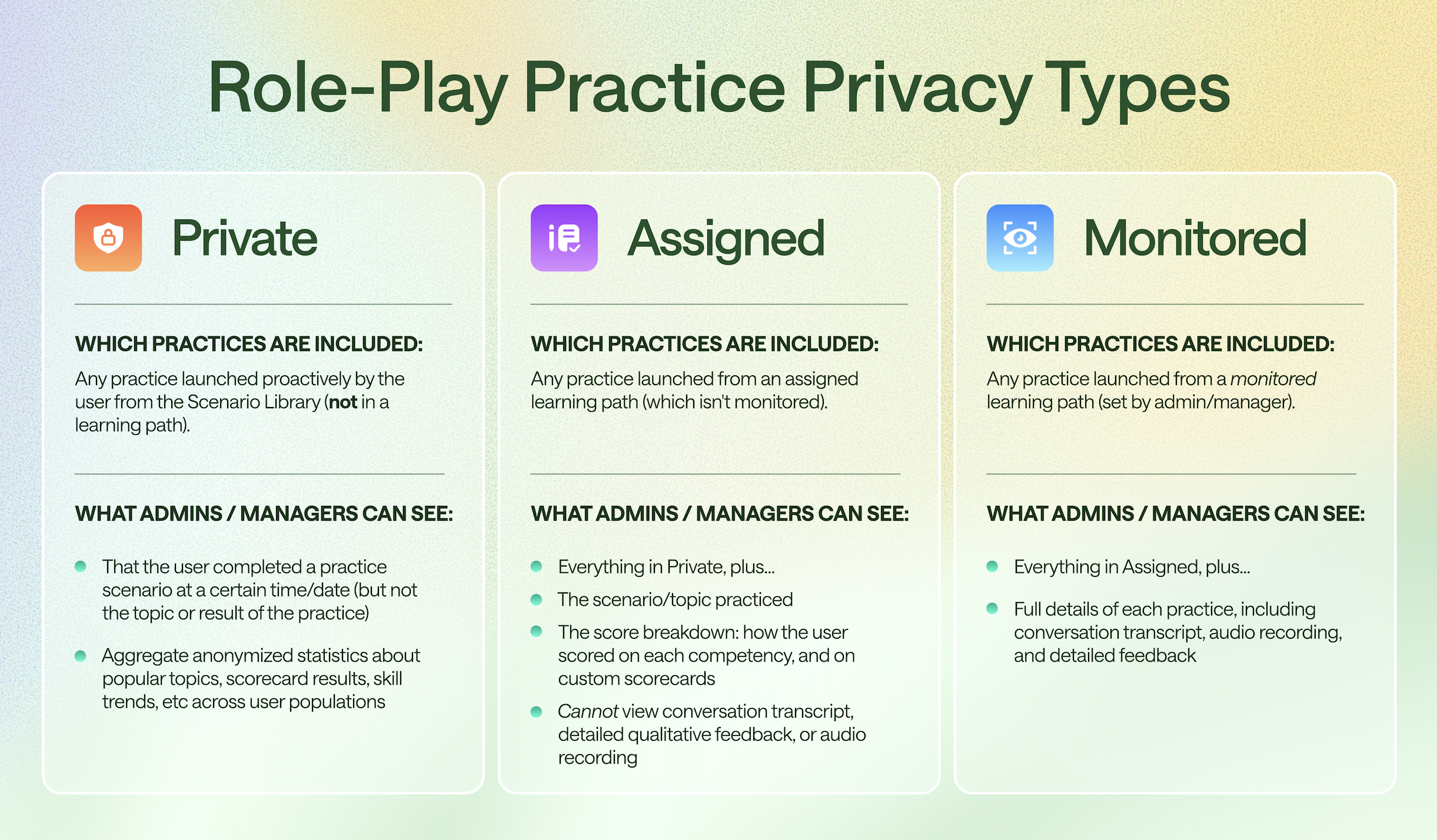
To balance psychological safety with organizational learning, Tenor uses three privacy layers for roleplay practice:
- Private
- Assigned
- Monitored
Each layer determines what administrators or managers can see about a practice session.
The Three Privacy Layers
Private Practice
Private practice gives users a fully confidential space to experiment, practice, and build confidence.
When Private Practice Happens
Private practice occurs when a user launches a scenario directly from the Scenario Library rather than through a learning path.
What Admins and Managers Can See
Admins and managers cannot see the details of the practice session.
They can only see:
- That a practice occurred
- The date and time of the practice
- Aggregate, anonymized trends across the organization (for example popular topics or skill trends)
What Admins and Managers Cannot See
They cannot see:
- The scenario topic
- The user's responses
- Scores or results
- Any conversation transcripts, feedback, or audio
What Users See
Users will see a message similar to:
“This conversation is private. Your company admins can see you used Tenor, but they can't see what you practiced or how you did.”

Assigned Practice
Assigned practice is typically used for learning paths or training programs.
It allows managers to see skill progress without exposing the exact conversation content.
When Assigned Practice Happens
Assigned practice occurs when a user launches a scenario from a learning path that is not monitored.
What Admins and Managers Can See
Everything available in Private practice, plus:
- The scenario or topic practiced
- The score breakdown across competencies
- Results from any custom scorecards
What Admins and Managers Cannot See
Admins cannot access the conversation itself, including:
- The conversation transcript
- Audio recordings
- Detailed qualitative feedback
What Users See
Users will see a message similar to:
“This conversation is assigned to you. Your company admins can see your scores, but they won't know exactly what you said.”

Monitored Practice
Monitored practice is used when organizations want full visibility for coaching, certification, or evaluation purposes.
When Monitored Practice Happens
Monitored practice occurs when a scenario is launched from a monitored learning path created by an admin or manager.
What Admins and Managers Can See
Everything included in Assigned practice, plus:
- Full conversation transcript
- Audio recording of the practice
- Detailed AI feedback
- Full practice session details
What Users See
Users will see a message similar to:
“This conversation is monitored. Your company admins can view your full conversation, including anything you say.”

Why Tenor Uses Privacy Layers
These privacy layers allow organizations to balance two important needs:
Psychological Safety for Practice
Employees need a safe space to experiment, make mistakes, and learn without feeling evaluated.
Private and Assigned practice provide that safety.
Insight for Coaching and Training
Organizations also need learning insights to support development programs.
Monitored practice enables:
- Coaching conversations
- Certification exercises
- Leadership development programs
- Role-specific training
Quick Summary
| Privacy Type | Typical Use Case | What Admins Can See |
|---|---|---|
| Private | Self-guided practice | Practice occurred (no details) |
| Assigned | Learning paths and training | Topic and score breakdown |
| Monitored | Coaching, certification, evaluation | Full conversation and feedback |
💡 Tip: The privacy status of a practice session is always clearly displayed in the Tenor interface before the conversation begins.